The Big Picture: What Just Launched?
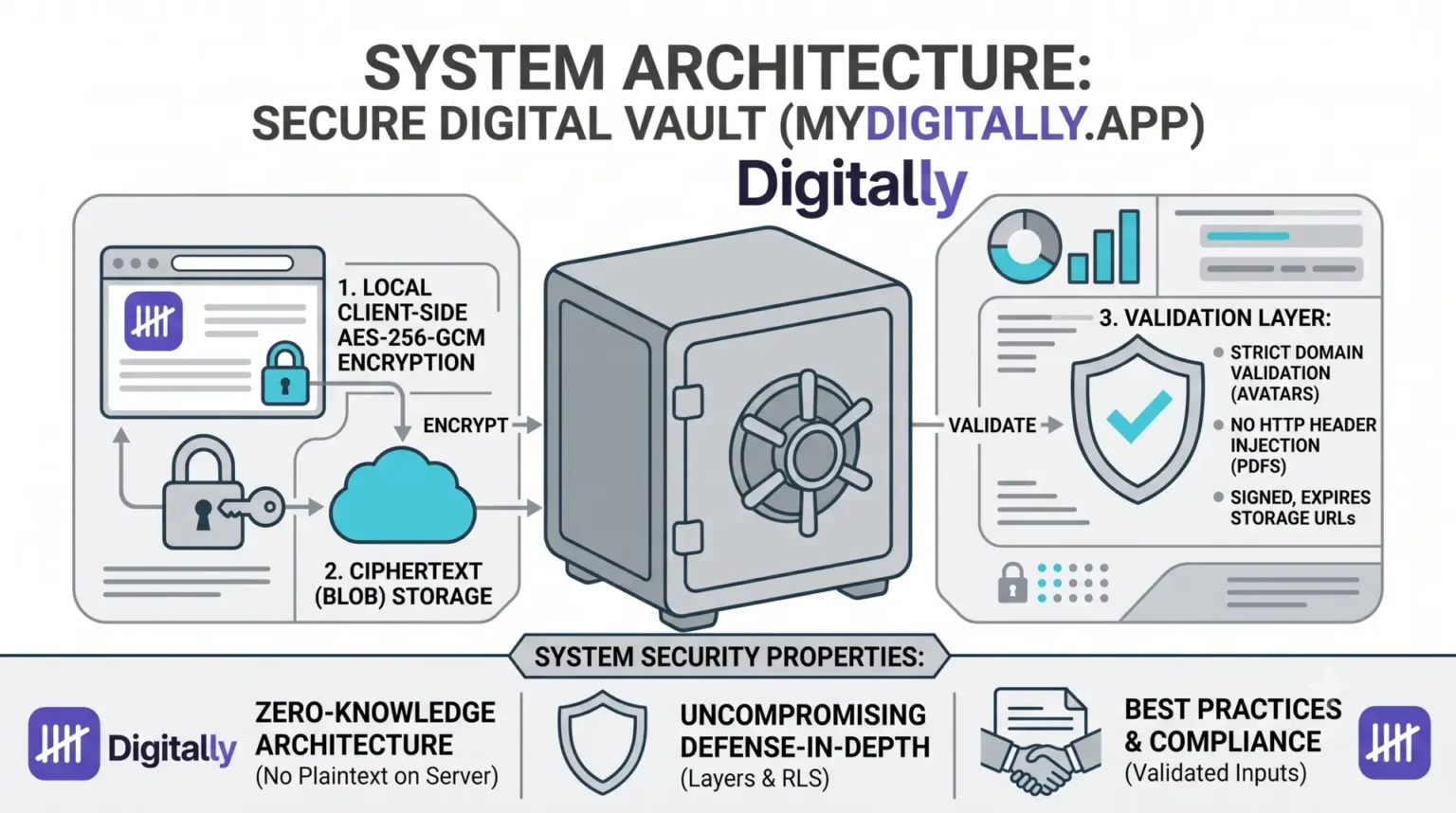
A new Encrypted Credential Vault has been successfully pushed to the project. Think of this like a mini-1Password or Bitwarden built right into the app. When you view an asset, you can now securely attach passwords, API keys, or private notes to it.
Before this code went live, the latest updates from other teammates (the Friends feature, security docs, and styling tweaks) were safely pulled in and combined with it.
Zero-Knowledge Security: How It Keeps Data Safe
The core philosophy here is “Zero-Knowledge.” The server (and anyone running the database) has absolutely no idea what your passwords are.
Here is exactly how that works in plain English:
- Your Master Passphrase Never Leaves Your Device: When you type in a passphrase to lock/unlock your vault, it lives only in your browser’s temporary memory (React state). It is never sent over the internet, never saved in a cookie, and never stored in the database. If you refresh the page, the app instantly forgets it.
- Encryption Happens Locally: The moment you click “Save,” your browser scrambles your plaintext password into unreadable gibberish (ciphertext) using a highly secure military-grade algorithm (AES-256-GCM). Only this scrambled gibberish is sent to the database.
- The “Wrong Passphrase” Guardrail: If you enter the wrong passphrase to unlock the vault, the system won’t just output corrupted, messy text. The algorithm checks a unique digital signature (authentication tag). If the signature doesn’t match, it immediately throws an error saying the passphrase is wrong.
- Brute-Force Protection: To stop hackers from using automated scripts to guess your passphrase, the system uses a technique called PBKDF2 with 100,000 iterations. This essentially forces a hacker’s computer to do an immense amount of heavy math for every single guess, making brute-force attacks incredibly slow and expensive.
- No Identical Blueprints: Every single password saved gets its own unique, random “salt” (random starting data) and “IV” (initialization vector). This means if you save the exact same password (“Password123”) for two different accounts, they will look completely different when scrambled in the database.
The Golden Rule: Because the server never stores your passphrase, there is no “Forgot Password” button. If you lose your master passphrase, the data is permanently lost.
Building a Digital Vault: How We Engineered Security into MyDigitally.app
When you build an app designed to catalog and protect your digital legacy, security isn’t just a compliance item on a checklist. It is the bedrock of user trust. If future customers are going to trust mydigitally.app with proof-of-ownership documents, financial asset locations, and sensitive credentials, our defenses must be flawless.
To ensure this, we recently conducted a comprehensive, plain-language security audit of our entire application architecture. As a developer, my philosophy is simple: fail fast, eliminate fallback paths, and fix root causes rather than patching symptoms. Here is a behind-the-scenes look at how we approached this audit, the vulnerabilities we uncovered, and exactly how we re-engineered our platform to exceed modern security standards.
The Anatomy of a Secure Core: Zero-Knowledge Architecture
Before looking at specific fixes, it helps to understand the foundational security property we recently built into our Encrypted Credential Vault: Zero-Knowledge Architecture.
When a user attaches a password or an API key to an asset, the plaintext data never touches our network or servers.
How it Works under the Hood:
- Local Encryption: The browser takes the user’s master passphrase (which is never saved to cookies, local storage, or databases) and uses PBKDF2 with 100,000 iterations to derive a secure encryption key.
- AES-256-GCM Scrambling: The data is scrambled right inside the browser using military-grade AES-256-GCM encryption before ever hitting the network.
- Database Blindness: Our database provider (Supabase) only ever receives and stores an unreadable ciphertext blob containing a unique salt and initialization vector (IV).
If a malicious actor somehow breaks into our database, they won’t find a single password—only cryptographic gibberish. If you lose your master passphrase, even we cannot recover your data. This is what secure-by-design engineering looks like.
The Remediation Log: Fixing Real Vulnerabilities
Security is an ongoing game of eliminating edge cases. During our audit, we categorized findings into High, Medium, and Low risks, treating each as a structural puzzle to solve once and for all.
1. Stopping the Hidden Tracking Pixels (Severity: High)
The Problem: When users updated their profile avatar, our backend server accepted the provided avatar_url without validation. While the user interface nudged people to upload images to our secure storage, an attacker could bypass the UI entirely and send a direct network request containing a link to a malicious server (e.g., https://attacker.com/tracking.gif). Whenever another user loaded that profile, their browser would silently ping the attacker, leaking their IP address and device data.
The Root Cause Fix: We introduced strict server-side validation. The backend now explicitly rejects any URL that does not begin precisely with our trusted bucket prefix:
2. Eliminating HTTP Header Injection in PDF Exports (Severity: High)
The Problem: When users downloaded a PDF compilation of their digital assets, the system dynamically named the file using their profile display name. If a user named themselves something containing structural punctuation (like quotes and semicolons), they could break out of the standard HTTP header boundaries and inject malicious instructions directly into the browser’s networking layer.
The Root Cause Fix: Rather than trying to clean up messy inputs with endless exceptions, we implemented a strict whitelist filter using regular expressions. We strip out everything except alphanumeric characters, spaces, and hyphens:
3. Locking Down Proof-of-Ownership Files (Severity: High)
The Problem: To catalog a digital legacy, users upload purchase receipts, registration emails, and screenshots. Initially, the storage bucket holding these files was set to “public.” Even though the file URLs used unguessable, long unique IDs, the files themselves were technically accessible over the open internet if someone intercepted the link.
The Root Cause Fix: We completely rewrote our storage access policies.
- We flipped the storage bucket switch from
public = truetopublic = false. - We added database-level Row-Level Security (RLS) rules so that only the authenticated owner of the asset can request a file.
- The application now generates short-lived, 1-hour signed URLs on the server side when the owner needs to view a file. Once that hour passes, the link expires and completely breaks for everyone else.
Layered Defense: Network and Database Hardening
True security relies on Defense in Depth—structuring your software so that even if one layer fails, a completely separate security layer stops the exploit.
Content Security Policy (CSP)
We locked down what our app is allowed to execute by deploying a strict Content Security Policy header inside our configuration files. This tells the browser to outright reject any external script, font, or style sheet that hasn’t been explicitly placed on our trusted allowlist. Even if an attacker somehow injects a malicious script tag into a user’s page, the browser will look at our CSP rules and refuse to execute it.
Row-Level Security (RLS) & Anti-Abuse Caps
We don’t just rely on our web server code to keep data private. Inside our Postgres database, we enforce strict Row-Level Security. This means the database engine itself verifies that the logged-in user ID matches the owner ID of the row being requested. If those IDs don’t match, the database returns absolutely nothing.
To prevent malicious scripts from flooding our systems, we also built hard application caps directly into our server logic:
- Maximum 500 assets per user.
- Maximum 100 shared links per user.
- Maximum 200 encrypted credentials per user.
Before any new row is created, an ultra-fast database count query executes. If a user exceeds their allocation, the application fails fast and rejects the request.
Our Uncompromising Security Ledger
To keep ourselves completely transparent, here is the quick-reference log of our security posture upgrades:
| Feature / Endpoint | Vulnerability Risk | Resolution Strategy |
|---|---|---|
| Authentication Endpoints | Credential Stuffing & Email Bombing | Enforced a max limit of 5 OTP requests and 2 password reset emails per hour via Supabase API layers. |
| Password Reset Redirects | Host Header Injection | Swapped out dynamic request headers for a hardcoded, un-forgeable environment variable target (NEXT_PUBLIC_APP_URL). |
| Friend Requests | Column Mutation Exploits | Upgraded Postgres RLS UPDATE policies with explicit WITH CHECK subqueries to prevent users from altering underlying friend IDs via direct API attacks. |
| File Uploads | Phishing Script Storage | Migrated file type verification from the browser layer directly into the storage bucket schema layer, rejecting invalid MIME types instantly. |
The Takeaway: Security is a Process, Not a Feature
Engineering mydigitally.app taught us that simple, explicit logic always beats clever, open-ended code. By rejecting implicit trust, sanitizing every boundary, and validating user context directly from encrypted server sessions rather than parameter inputs, we have engineered a fortress for your digital legacy.
When you use our platform, you aren’t just trusting our promises—you are trusting proven cryptographic architecture and defensive engineering standards.